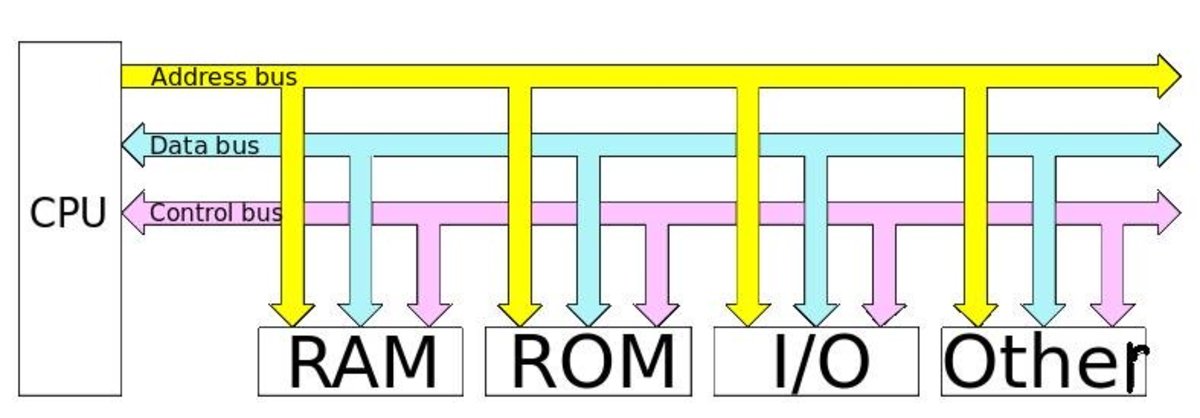
One is just a normal route, through which information flows from one computer component to another. This route is used for communication purpose and it is established between two or more computer components. We are going to examine the various computer bus architectures found in computers.
Different Types of Computer Buses
Functions of Buses in Computers
Summary of functions of buses in computers 1. Data sharing - All types of buses were found in computer transfer data between the external devices connected to the computer.
Simply send data in a serial or parallel method of transfer or data transfer. It allows 1, 2, 4 or 8 bytes of data at one time. (A byte is a group of 8 bits) How many bits can move buses at the same time, it is classified on the basis, which means that we have 8-bit, 16-bit, 32-bit or Are 64-bit buses
2. Addressing - The bus has an address line, which corresponds to the processor. The data can be sent to or from specific memory locations.
3. Power - A bus supplies power to various peripherals connected to it.
4. Timing - Simply provide a system clock signal to synchronize the peripherals attached to the rest of the system.
The expansion bus facilitates easy connection of more or additional components and devices on a computer such as a TV card or sound card.
Bus Terminologies
Computers have two major types of buses: 1. System bus:- This is just what connects the CPU from the main memory to the motherboard. The system bus is also called front-side bus, memory bus, local bus or host bus. 2. A number of I/O Buses,(I / O is a short form for input / output), connecting various peripheral devices in the CPU. These devices connect to the system bus through the 'bridge' implemented in the processor chipset. Other names for the I / O bus include "Extension Bus", "External Bus" or "Host Bus".
Expansion Bus Types
These are some of the common expansion bus types that have ever been used in computers:
ISA - Industry Standard Architecture
EISA - Extended Industry Standard Architecture
MCA - Micro Channel Architecture
VESA - Video Electronics Standards Association
PCI - Peripheral Component Interconnect
PCMCIA - Personal Computer Memory Card Industry Association (Also called PC bus)
AGP - Accelerated Graphics Port
SCSI - Small Computer Systems Interface.
ISA Bus
This is the most common type of initial extension bus, which was designed for use in the original IBM PC. IBM PC-XT used the 8-bit bus design. This means that transfers in data are only in 8 bit segments (i.e. one byte at a time). The ISA bus reached the clock speed of 4.77 MHz.
For the 80286-based IBM PC-AT, a better bus design, which could transfer 16-bit data at a time, was announced. The 16-bit version of the ISA bus is sometimes known as AT Bus (AT-Advanced Technology)
The revised AT bus provided 24 addresses of 24 lines, which can be addressed to 16 MB of storage. The AT was backward only with its 8-bit predecessor and allowed to use 8-bit cards in 16-bit expansion slots.
When it first appeared, the 8-bit ISA bus went at a speed of 4.77 MHz - the same speed as the processor. Over the years, the reforms eventually took part in the race of 8 Mhz at the clock speed of the AT bus.
Comparison Between 8 and 16 Bit ISA Bus
8-Bit ISA card (XT-Bus)
16-Bit ISA (AT –Bus card)
8-bit data interface
16-bit data interface
4.77 MHZ bus
8-MHZ bus
62-pin connector
62-pin connector
36-pin AT extension connection
Comparison of 8-bit, & 16-bit ISA Bus as Used in Early Computers.
MCA (Micro Channel Architecture)
ISM developed this bus as an ISA replacement when they launched PS / 2 PCs in 1987.
The bus offered several technical improvements over the ISA bus, for example, MCA ran at a speed of 10MHz and supported 16-bit or 32-bit data. It also just supports mastering - a technology that kept a mini-processor on each expansion card. In these mini-processors, too much data transfer was controlled to allow the CPU to perform other functions.
One advantage of MCA was the plug-in card software configuration; This means that the user requires minimal intervention during configuration.
MCA extension bus did not support ESA card and IBM decided to charge other manufacturers for royalty fees for the use of technology. This has made it unpopular and now it is an obsolete technique.
The EISA Bus
The EISA Bus Slots (on the left) Where EISA Cards Were Connected | Source
EISA (Extended Industry Standard Architecture)
EISA (Extended Industry Standard Architecture)
This is a just technology developed by a group of manufacturing as an alternative to MCA. Just architecture was designed to use the 32-bit data path and 32 address lines giving access to 4 GB of memory were provided.
Like MCA, EISA offered a disc-based setup for the card, but it still went on 8 MHz to be compatible with the ISA.
The EISA expansion slot is twice as deep as an ISA slot. If an ESA card is placed in the EISA slot, it will only use the top line of the connectors, however, a full EISA card uses both rows, it offers just Master
EISA cards were relatively expensive and were usually found on high end workstations and network servers
VESA Bus
It was also known as local bus or VASA-local bus, VASA (Video Electronics Standards Association) was invented to help standardize the video specifications of PC, thus solving the problem of proprietary technology where various The makers tried to develop their buses.
The VL bus provided a 32-bit data path and took part in 25 or 33 MHz. It ran on the same clock frequency as the host CPU. But this became a problem, because the processor speed increased, because faster peripherals are needed to run, they are much more expensive than they build.
It was difficult to apply VL-bus to new chips such as 486 and new pentium and finally VL-bus was replaced by PCI.
The VASA slots had an extra set of connectors and thus the cards were bigger. VASA designs were backward compatible with old ESA cards.
Features of the VESA local bus card:-
32-bit interface
62/36-pin connector
90+20 pin VESA local bus extension
Peripheral Component Interconnect
Peripheral Component Interconnect (PCI) is one of the latest developments in bus architecture and is the current standard for PC expansion cards. Intel developed and launched it as the expansion bus for the Pentium processor in 1993. It is a local bus like VESA, that is, it connects the CPU, memory and peripherals to wider, faster data pathway.
PCI supports both 32-bit and 64-bit data width; it is compatible with 486s and Pentiums. The bus data width is equal to the processor, such as, a 32 bit processor would have a 32 bit PCI bus, and operates at 33MHz.
PCI was used in developing Plug and Play (PnP) and all PCI cards support PnP. This means a user can plug a new card into the computer, power it on and it will “self-identify” and “self-specify” and start working without manual configuration using jumpers.
Unlike VESA, PCI supports bus mastering that is, the bus has some processing capability and thus the CPU spends less time processing data. Most PCI cards are designed for 5v, but there are also 3v and dual-voltage cards. Keying slots used help to differentiate 3v and 5v cards and also to make sure that a 3v card is not slotted into a 5v socket and vice versa.
Types of buses in computer architecture
Reviewed by It E Research
on
December 28, 2017
Rating: 5
Munere veritus fierent cu sed, congue altera mea te, ex clita eripuit evertitur duo. Legendos tractatos honestatis ad mel. Legendos tractatos honestatis ad mel.
, click here →



.png)


No comments